My Journey Understanding OpenClaw's Architecture

Introduction: Three Days in the TypeScript Trenches
I’m not a TypeScript wizard. Far from it, actually. But I spent the last 3-4 days diving deep into the OpenClaw codebase, trying to understand how this multi-channel AI assistant actually works under the hood. This post is my attempt at documenting what I learned - mostly for my own understanding, but hopefully it helps you too if you’re exploring the project.
Why did I get curious? Well, I was fascinated by the idea of having a single AI assistant that works across WhatsApp, Telegram, Discord, Slack, and 30+ other messaging platforms - all running on my own hardware. No cloud service, no data leaving my machine unless I want it to. That’s pretty cool.
What is OpenClaw, Anyway?
Think of OpenClaw as a bridge between your messaging apps and AI. Here’s the simple version:
- You send a message on WhatsApp (or Telegram, Discord, etc.)
- OpenClaw receives it and talks to an AI model (like Claude or GPT)
- The AI responds back to you in the same app
The genius part? It’s all self-hosted. It runs on your own computer or server - not some company’s cloud. You control the data, you control the setup, and it’s all open source (MIT licensed).
Why this matters:
- Privacy: Your conversations stay on your hardware
- Convenience: One AI assistant everywhere you chat
- Flexibility: Open source means you can see and change how it works
- Multi-channel: 30+ messaging platforms through one system
Let’s dig into how they built this thing.
The Big Picture: How It All Fits Together
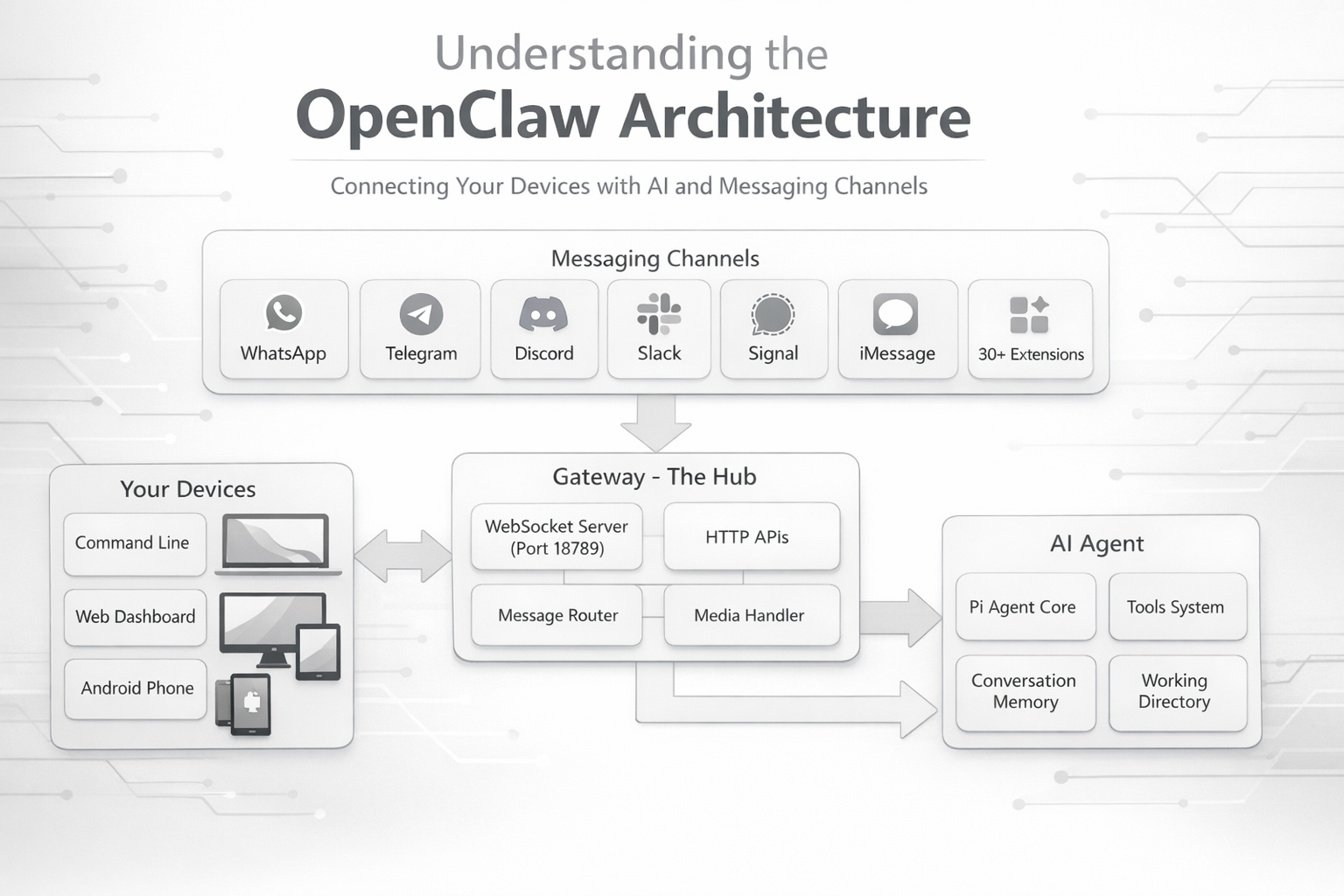
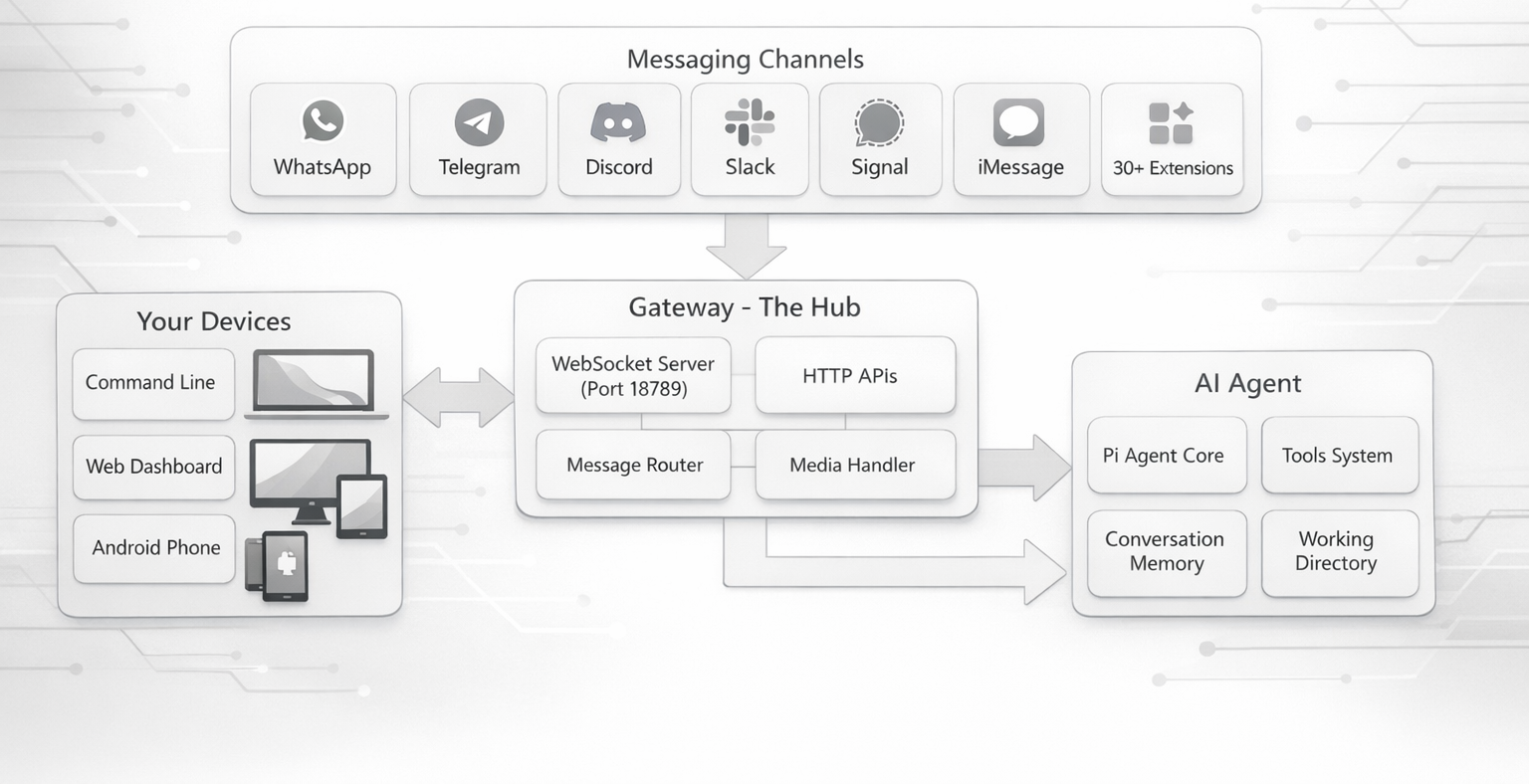
After days of reading code, here’s what I figured out: OpenClaw has a surprisingly elegant architecture built around one central idea - the Gateway.
Key Ideas
One Gateway to rule them all: There’s a single program running (the Gateway) that handles everything. It’s like a traffic controller at an airport - coordinating all the planes (messages) coming and going.
Everything connects to the Gateway: Your phone, your terminal, your web browser - they all talk to this one Gateway via WebSocket (think of it like a phone call that stays open).
Mobile devices are helpers: Your iPhone or Android can be a “node” that adds extra capabilities to the system - like taking photos, recording your screen, or showing a canvas that the AI can draw on.
Plugins make it extensible: Want to add support for a new messaging app? Just write a plugin. The core system doesn’t need to change.
Core Component #1: The Gateway (The Heart of Everything)
The Gateway is the central hub - it runs a WebSocket server (port 18789) that manages all connections, routes messages to the right AI agent, and tracks conversation sessions. It validates every message using TypeBox schemas to prevent unauthorized access. Think of it as the traffic controller coordinating all incoming and outgoing messages across your messaging apps.
Core Component #2: The Channel System (Talking to All Those Apps)
OpenClaw supports over 30 messaging apps through a unified channel model. Built-in channels include WhatsApp (Baileys), Telegram (grammY), Discord, Slack, Signal, and iMessage. Additional platforms are added via plugins with a manifest file, adapter functions, and capability declarations. The genius part: all channels work the same way internally - whether it's WhatsApp or Discord, they all have messages, users, and send/receive operations. This unified approach makes adding new channels straightforward.
Core Component #3: The Router (Who Gets Which AI?)
When a message arrives, OpenClaw needs to decide which AI agent handles it. The routing system uses a priority hierarchy: exact person match → thread/conversation → Discord role-based → server/workspace → channel account → channel type → default. The system picks the most specific match, so a "specific person" rule beats a "Discord Server" rule. OpenClaw tracks conversations with session keys (e.g., agent:my-agent:whatsapp:group:123) so each chat stays separate - your work Discord won't leak into personal WhatsApp.
Core Component #4: The AI Agent Brain (Where the Magic Happens)
Found in: src/agents/
Okay, so here’s where it gets really interesting. OpenClaw uses something called “Pi” (pi-mono) as its AI agent runtime. Think of Pi as the actual AI brain that thinks, responds, and uses tools.
The Workspace: Where the AI Lives
Each agent has a folder (workspace) where it keeps its stuff. When you first set up an agent, it looks for these markdown files:
AGENTS.md- Operating instructions (“here’s how you should behave”)SOUL.md- Personality and boundaries (“be helpful but not pushy”)TOOLS.md- Notes about tools (“use the browser tool when you need to check a website”)IDENTITY.md- Who the agent thinks it isUSER.md- Info about you (so it can personalize responses)HEARTBEAT.md- Periodic check-in instructionsBOOTSTRAP.md- First-time setup ritual (deleted after first run)
These get loaded when a conversation starts, so the AI knows its identity and how to act. It’s like giving the AI its “instruction manual” every time.
The Conversation Logs
Every chat is saved as a .jsonl file (JSON lines format) at:
~/.openclaw/agents/<agent-name>/sessions/<session-id>.jsonl
Each line is a turn in the conversation. This is how the AI remembers what you talked about!
Tools: What Can the AI Actually DO?
This blew my mind - the AI can do way more than just chat. It has tools for:
File operations:
read,write,edit- Work with filesapply_patch- Apply code patches
Running code:
exec,bash- Run commands on your computerprocess- Manage background processes
Web stuff:
web_search- Search the internetweb_fetch- Grab content from URLsbrowser- Control a real browser (click buttons, fill forms!)
Messaging:
message- Send messages to other channelssessions_*- Manage multiple conversation sessions
Your devices:
canvas- Show visual content on your phone/tabletcamera- Take photos with your phonenodes- Control connected devices
Automation:
cron- Schedule recurring tasksgateway- Control the Gateway itself
Tool Profiles: Controlling What’s Allowed
You can configure “tool profiles” to limit what an agent can do:
minimal- Just chat, no toolsmessaging- Can send messagescoding- Can read/write files and run codefull- Everything is allowed
Here’s a config example:
{
  tools: {
    profile: "coding",  // Allow coding tools by default
    deny: ["exec"]      // But don't let it run commands
  }
}
You can even set different tool policies for different AI providers! Like, maybe Google’s models get fewer tools than Claude.
Files I Looked At
src/agents/- How the Pi runtime integratessrc/config/- Configuration loading and validation
Core Component #5: Media Pipeline (Images, Audio, Video)
Location: src/media/
One thing I didn’t expect: OpenClaw has a full media pipeline. You can send images, audio, video - and the AI can process them.
Inbound media flow:
- You send an image to WhatsApp
- Gateway saves it:
~/.openclaw/media/inbound/ - If it’s audio, it can transcribe it
- If it’s an image, it can analyze it with vision models
Outbound media flow:
- AI wants to send an image
- It outputs:
MEDIA:/path/to/image.jpgorMEDIA:https://url-to-image - Gateway parses it with
splitMediaFromOutput() - Sends via the appropriate channel adapter
Image operations they support:
- Resize images (
resizeToJpeg()) - Get metadata like dimensions
- Temporary hosting with TTL cleanup
Pretty comprehensive for a self-hosted system!
Multi-Platform: From Raspberry Pi to iPhone
One thing that impressed me: OpenClaw runs on everything.
Where Can You Run the Gateway?
Desktop/Server:
- macOS - LaunchAgent (background service) - Can be Gateway & Node
- Linux - systemd (system service) - Can be Gateway & Node
- Windows - Via WSL2 + systemd - Can be Gateway only
- Raspberry Pi - systemd - Can be Gateway & Node
Mobile:
- iOS - Foreground app - Can be Node only
- Android - Foreground service - Can be Node only
The key insight: iOS and Android never run the Gateway. They’re “nodes” - they connect to a Gateway running somewhere else (your Mac, Linux server, or Raspberry Pi).
What's a "Node"?
A node is a device that extends the Gateway’s capabilities. Your iPhone can be a node that provides:
- Camera (take photos on command)
- Screen recording
- Canvas display (AI can show you visual content)
- Location services
- Voice wake (“Hey AI, what’s the weather?”)
Nodes connect with role: "node" and declare their capabilities. The Gateway then knows: “Oh, this iPhone can take photos and show a canvas. Cool!”
Security & Device Discovery
Device Pairing: All clients (including nodes) must pair with the Gateway. Local connections are auto-approved, while remote connections require challenge/response authentication and explicit approval. Once approved, devices get a token for future connections. Approve pending devices with: openclaw nodes approve <device-id>
Discovery Methods: Devices can find the Gateway via Bonjour/mDNS (local network), Tailscale (VPN for cross-network), or manual host/port entry.
The Plugin System: Extending Everything
Location: src/plugins/ and extensions/
This part took me a while to understand, but it’s actually really well designed.
How Plugins Work
Plugins are TypeScript modules that get loaded at runtime. They run in-process with the Gateway (not sandboxed), so they’re treated as trusted code.
Discovery order (first match wins):
- Paths in config:
plugins.load.paths - Workspace extensions:
<workspace>/.openclaw/extensions/ - Global extensions:
~/.openclaw/extensions/ - Bundled extensions:
<openclaw>/extensions/
The Plugin API
When your plugin loads, it gets an api object with methods like:
export function myPlugin(api) {
  // Register a channel
  api.registerChannel({ ... });

  // Register a tool
  api.registerTool({ ... });

  // Register a provider (LLM auth)
  api.registerProvider({ ... });

  // Add HTTP routes
  api.registerHttpRoute({ ... });

  // Hook into events
  api.registerHook("before_agent_start", async (ctx) => {
    // Your code here
  });
}
Plugin Manifest
Every plugin needs an openclaw.plugin.json:
{
  "id": "my-plugin",
  "channels": ["my-channel"],
  "configSchema": {
    "type": "object",
    "properties": {
      "apiKey": { "type": "string" }
    }
  }
}
The manifest is validated before the plugin code runs. This is smart - it means config errors are caught early, before any plugin code executes.
Types of Plugins
- Channel plugins - Add messaging platform support
- Provider plugins - Add LLM/auth integrations
- Memory plugins - Add memory storage backends
- Skill plugins - Add specialized capabilities
The “Slots” System
Some plugin types are exclusive. Like memory plugins - you can only have one active at a time. You configure which one with:
{
  plugins: {
    slots: {
      memory: "memory-lancedb"  // Use LanceDB for memory
    }
  }
}
Pretty clever way to handle mutually exclusive functionality!
The Data Flow: From Your Message to AI Response
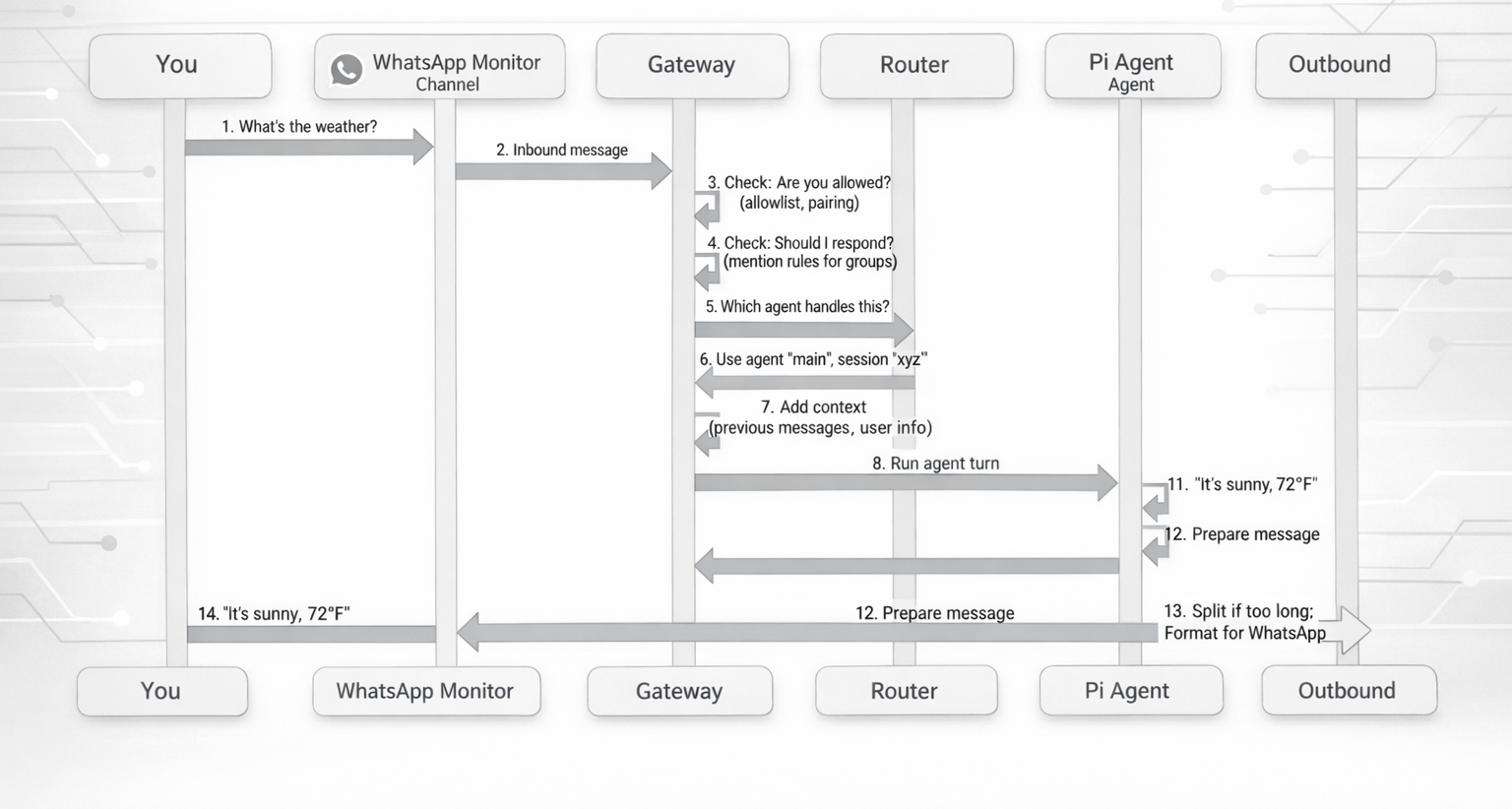
Let me walk through what happens when you send “What’s the weather?” on WhatsApp:
Step by Step
- Inbound: WhatsApp monitor receives your message
- Access Control: Gateway checks if you’re allowed (allowlist, pairing status)
- Group Gating: If it’s a group, check if the bot was mentioned
- Routing:
resolveAgentRoute()picks which agent handles this - Context: Add previous messages, inject template variables like
{{MediaPath}} - Agent Run: Pi agent processes your message, maybe uses tools
- Outbound: Response gets normalized (split if too long, formatted for the channel)
- Delivery: Channel-specific sender delivers it back to you
The Context Templating
Before the agent sees your message, OpenClaw can inject context variables:
{{MediaPath}}- Paths to any images/files you sent{{Transcript}}- Audio transcriptions- User info from
USER.md - Previous conversation history
This is how the AI gets all the context it needs!
Design Patterns I Noticed
1. Dependency Injection
Instead of hardcoding channel send functions, they use dependency injection:
// In src/cli/deps.ts
function createDefaultDeps() {
  return {
    sendWhatsApp: (...) => { ... },
    sendTelegram: (...) => { ... },
    // etc
  };
}

// Commands receive these as parameters
async function handleCommand(deps) {
  await deps.sendWhatsApp(message);
}
This makes testing way easier - you can inject mock functions!
2. Configuration Hot Reload
The Gateway can reload most config changes without restarting:
{
  gateway: {
    reload: {
      mode: "hybrid"  // or "hot", "restart", "off"
    }
  }
}
Super useful for development!
3. Protocol Type Safety
They generate types across languages:
- Write TypeBox schemas (TypeScript)
- Generate JSON Schema
- Generate Swift models for iOS/macOS/Android
Scripts: scripts/protocol-gen.ts, scripts/protocol-gen-swift.ts
This means the protocol is type-safe on both sides!
4. Module Organization
- Tests live next to source:
foo.tsandfoo.test.tsin same folder - E2E tests:
foo.e2e.test.ts - Keep files under 500-700 lines (guideline, not hard rule)
- ESM-only, no CommonJS
What Makes This Architecture Special?
After spending days in the code, here’s what I think they got really right:
1. Gateway-Centric Design
Having one Gateway that manages everything simplifies deployment massively. You don’t need to coordinate multiple services - it’s just one process.
2. Unified Channel Model
Treating all messaging platforms the same internally is genius. Whether it’s WhatsApp or Discord, they all have the same concepts: messages, users, groups. The channel-specific stuff is isolated in adapters.
3. Role-Based Device Multiplexing
The same WebSocket protocol works for control clients (your laptop) and nodes (your phone). They just declare different capabilities. Elegant!
4. Plugin Runtime Injection
Plugins don’t import from core code. Instead, they get an api.runtime object that exposes what they need. This keeps plugins from depending on internal implementation details.
5. Hierarchical Routing
The routing priority system (peer → guild → team → channel → default) is deterministic and intuitive. You can predict which agent will handle a message.
6. Tool Profiles
Being able to configure tool access per agent and per provider is really flexible. You might want your personal agent to have full file access, but limit your work agent.
What I’m Still Figuring Out
Even after 3-4 days, there are parts I haven’t fully grasped:
- How exactly does the session pruning work?
- The memory plugin system seems complex - need to dig deeper
- The Canvas A2UI stuff is interesting but I only scratched the surface
- Haven’t fully explored the webhook/cron automation features
That’s the thing about a mature codebase - there’s always more to learn!
Deployment Options
You can run OpenClaw in several ways:
Simple:
npm install -g openclaw@latest
openclaw onboard --install-daemon
Docker: Multi-stage builds, PNPM-based
Nix: Declarative configuration for the Nix folks
Cloud Platforms:
- Fly.io
- Railway
- GCP
- Hetzner
- Oracle Cloud (free tier works!)
Raspberry Pi: Perfect for an always-on gateway. A Pi 4 with 4GB RAM works great!
Where Everything Lives
~/.openclaw/
├── openclaw.json           # Main config
├── credentials/            # Channel auth tokens
├── agents/
│   └── <agent-id>/
│       └── sessions/       # Conversation logs
├── workspace/              # Agent working directory
│   ├── AGENTS.md
│   ├── SOUL.md
│   └── TOOLS.md
└── media/
    └── inbound/            # Received images/audio
Security Model
Direct Message Access
By default, OpenClaw is locked down:
- Unknown senders get a pairing code
- You must explicitly approve them:
openclaw pairing approve <code> - Only then can they talk to your AI
To open it up (not recommended for public bots):
{
  channels: {
    whatsapp: {
      dmPolicy: "open",
      allowFrom: ["*"]
    }
  }
}
Tool Security
You control what tools each agent can use:
{
  tools: {
    profile: "coding",  // Default: coding tools
    deny: ["exec"]      // But no command execution
  },
  agents: {
    list: [{
      id: "personal",
      tools: {
        profile: "full"  // Override: this agent gets everything
      }
    }]
  }
}
Gateway Authentication
- Token or password required for non-local connections
- Device pairing for nodes
- Challenge/response for remote connects
- Optional TLS + certificate pinning
Conclusion: What I Learned
After spending 3-4 days deep in this codebase, I'm impressed by how well-architected OpenClaw is. Here's what stands out:
It's genuinely local-first: Not "local-first with cloud backup" - actually local-first. Your gateway runs on your hardware, your data stays on your hardware (unless you explicitly send it to an LLM provider).
It's built for extension: The plugin system isn't an afterthought. Channels, tools, providers, memory backends - all pluggable.
It handles complexity well: Supporting 30+ messaging platforms, multiple AI providers, mobile nodes, tool security - and it still feels manageable.
Mobile devices are first-class: iOS and Android aren't just "also supported" - they're designed as nodes from the ground up.
The code is readable: Despite being a complex system, the code is organized logically. Tests are colocated, files are reasonably sized, and there's good separation of concerns.
What's Unique Here?
Compared to other AI assistant projects I've looked at:
- Most are single-channel (just Discord or just Telegram)
- Most require cloud deployment
- Most don't support multiple agent routing
- Most don't have a node system for extending with your devices
- Most don't have this level of plugin extensibility
OpenClaw does all of these things.
Things I'd Love to Explore More
- The memory system with LanceDB integration
- How the browser automation tool works
- The Canvas A2UI rendering system
- Cron jobs and webhook automation
- Voice wake on macOS/iOS
Resources for Going Deeper
If you want to explore further:
- Main docs: https://docs.openclaw.ai
- Architecture docs: https://docs.openclaw.ai/concepts/architecture
- Gateway docs: https://docs.openclaw.ai/gateway
- Channel docs: https://docs.openclaw.ai/channels
- GitHub repo: https://github.com/openclaw/openclaw
Final Thoughts
I started this journey not knowing much TypeScript and definitely not understanding how multi-channel AI assistants work. Three days later, I have a much better grasp of both.
What impresses me most is that OpenClaw solves a real problem - having your AI assistant everywhere you communicate - without compromising on privacy or control. And the architecture makes it possible to extend the system without needing to understand the entire codebase.
If you're building something similar, or just want to understand how complex TypeScript projects are structured, I'd recommend exploring the OpenClaw codebase. It's a great example of:
- Clean separation of concerns
- Plugin architecture done right
- Protocol-based communication
- Multi-platform support
- Security-first design
Now I need to actually use it instead of just reading the code. But hey, understanding the architecture first isn't a bad approach!
What's Next for Me?
After understanding how OpenClaw works, I'm planning to build my own super lightweight version using a tech stack I'm more comfortable with. Not to replace OpenClaw - it's way more mature and feature-rich than what I could build - but as a learning exercise to really internalize these architectural concepts.
I'm thinking:
- Maybe Python instead of TypeScript (I know it better)
- Start with just 1 messaging channels instead of 30+
- Simpler routing (no multi-agent at first)
- Basic tool system (just file operations and web search)
- No mobile nodes initially - just get the core Gateway → Agent flow working
The goal isn't to build something production-ready. It's to learn by doing. Sometimes the best way to understand an architecture is to try implementing a simplified version yourself. I'll probably hit all the edge cases and "gotchas" that the OpenClaw team already solved, but that's part of the learning process!
💬 Reach out on LinkedIn or subscribe on Substack for more deep dives into AI systems and architecture.